

Overview
The client, a leading healthcare-focused organization, had long depended on a large Excel workbook to manage critical operational data. Over time, this approach became unsustainable. As data volume and user activity increased, the Excel system suffered from slow performance, frequent crashes, and the inability to handle concurrent edits without data being overwritten. The lack of validation allowed inconsistent, junk entries, while the absence of an audit trail made it difficult to track changes or maintain data integrity. These limitations began to severely impact daily operations and decision-making.
Customer Challenges
As the client’s operations scaled, their Excel-based system began showing serious limitations across performance, usability, and data accuracy. What once worked for a small team became a bottleneck in a growing, collaborative environment

Manual Bulk Uploads Prone to Errors
Bulk data entry was done through manual copy-paste from CSVs into Excel, with no validation or formatting checks. Errors like misaligned columns, incorrect delimiters, or invalid values often caused database ingestion failures and required manual correction.

Inconsistent and Unvalidated Data Inputs
The Excel-based system lacked input controls, allowing users to freely enter data into any field. This resulted in issues like inconsistent naming conventions, incorrect values, and frequent missing entries, which severely impacted data quality and downstream analysis.

High Risk of Duplicate Values
There were no constraints or detection mechanisms in place to catch duplicates during data entry. This led to the same entity being entered multiple times with slight variations, causing confusion, bloated datasets, and unreliable reporting.

No User Accountability or Change Tracking
Excel provided no visibility into who modified what or when. This made it impossible to trace the source of errors, resolve data conflicts, or hold users accountable, especially when the file was accessed by multiple departments.

Slow Performance with Larger Files
As data volume increased, the Excel file grew cumbersome, taking longer to open and slowing down significantly during edits or filtering. It occasionally crashed or froze, forcing users to restart their work and lose progress.

Limited Multi-User Collaboration
Multiple users could not work on the Excel file at the same time without risking data conflicts. Concurrent edits often resulted in overwritten entries, version mismatches, or lost updates, making teamwork highly inefficient.

Lack of Standardization in Data Entry
There were no dropdowns or formatting rules to guide user input, which led to inconsistent naming conventions for countries, product types, and other key fields. This inconsistency made data aggregation and analysis difficult and unreliable.
Architecture Diagram
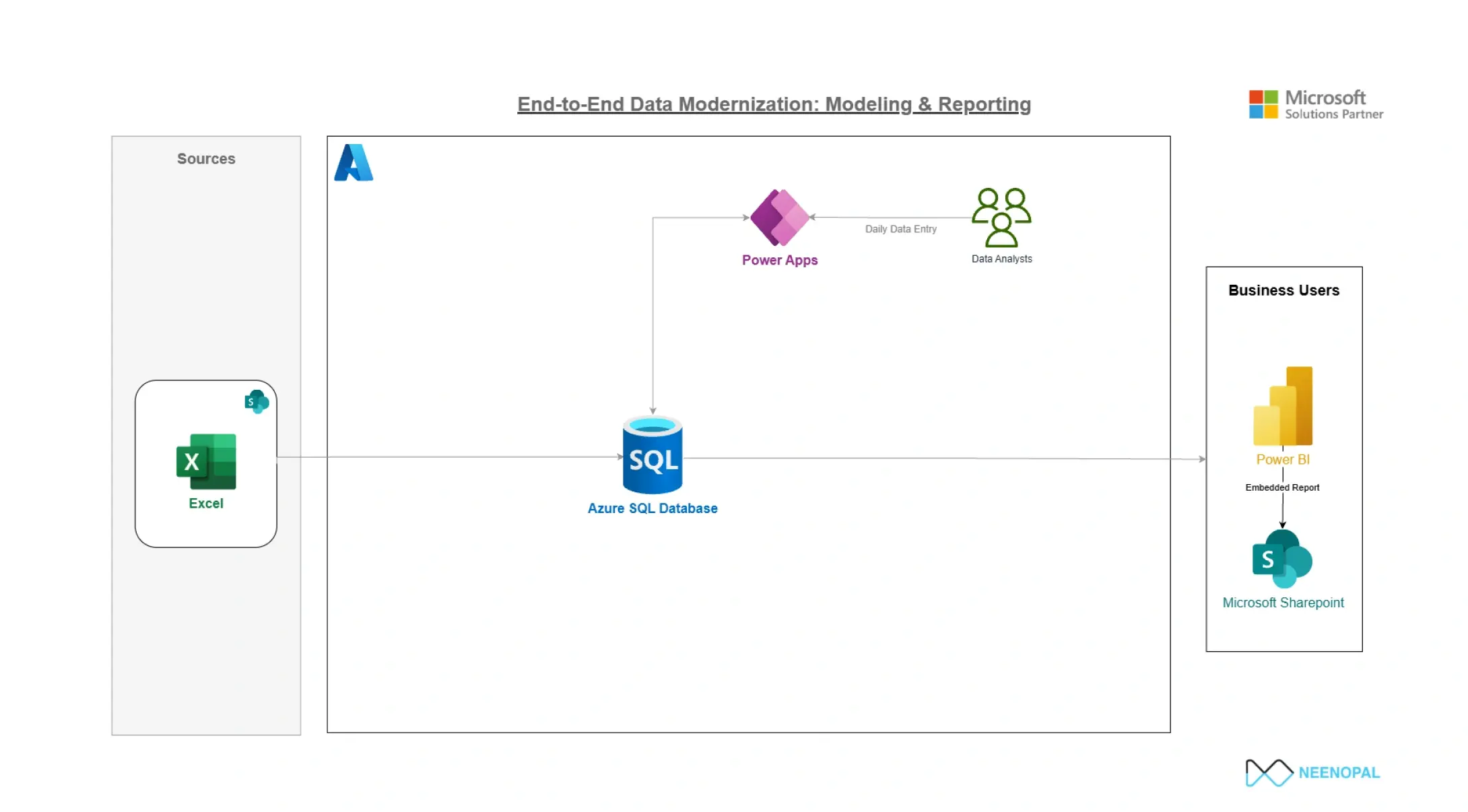
A scalable, validation-driven architecture enabling secure multi-user data entry, real-time processing, and centralized database control across modular applications.
Solutions
To overcome these challenges, we designed a modern solution using Microsoft Power Apps with a centralized Azure SQL Database. The system was split into modular apps to boost performance and ease maintenance. Guided forms with validation controls ensured accurate data entry, while a custom bulk upload framework with row-level checks improved data quality at scale. Features like autofill logic, real-time scoring, and a secure backend further enhanced usability, consistency, and audit readiness.
01.
Modular Power Apps Architecture for Performance and Maintainability
To improve system performance and ensure long-term maintainability, the solution was restructured into three modular Power Apps instead of relying on a single monolithic application. Each app was designed to handle only 3–4 related tables, which reduced data load and significantly enhanced responsiveness. A unified navigation screen with deep links allowed users to move seamlessly between apps, preserving a cohesive user experience. This modular setup also enabled independent deployment of updates or bug fixes, minimizing the risk of disruption and reducing overall downtime.
02.
Dynamic Guided Forms for Accurate Data Entry
To address issues with inconsistent and unvalidated data, structured guided forms were implemented in place of free-text fields. These forms used dropdown controls connected to lookup tables, ensuring users could only select valid values. The dropdowns included search functionality to improve usability, particularly when working with large datasets. Conditional formatting and real-time validation prompts guided users through the forms, helping them complete required fields accurately and reducing the likelihood of errors during submission.
03.
Custom Bulk Upload Framework Using Delimiter-Based Parsing
A tailored bulk upload system was developed to allow users to import data efficiently without compromising integrity. Power Apps were extended to accept “!-delimited” text as a safer and more reliable alternative to standard CSV files. To support this, a custom Excel-based converter tool was created, enabling users to generate properly formatted files for upload. Within the app, the Split() function was used to parse and map each data value to the appropriate fields, streamlining the upload process while maintaining data structure.
04.
Row-Level Validation and Error Logging Before Submission
To further strengthen data quality, each row in the bulk upload was individually validated within the app before submission. The validation checks included confirming correct data types, ensuring mandatory fields were completed, and verifying foreign key references. Any invalid rows were flagged with clear error messages indicating the specific issue and its location. This allowed users to correct only the problematic entries and re-upload, making the process more efficient and reducing the back-and-forth typically involved in bulk data correction.
05.
Patch()-Based Record Editing with Form Control for New Entries
The app employed two data handling approaches to ensure precise and secure updates. Existing records were edited using the Patch() function, which allowed selective updates based on unique record IDs. For new data entries, the SubmitForm() method was used, adhering to low-code best practices and simplifying form-based submissions. This separation of logic ensured that edits and new entries were handled appropriately, reducing the risk of accidental data overrides and maintaining system stability.
06.
Autofill Logic for Linked Fields to Minimize User Input
To improve data entry speed and maintain consistency, intelligent autofill logic was applied across the forms. Based on user selections, such as a product name or organization code, dependent fields were automatically populated using the LookUp() function. These autofilled fields were set to read-only to prevent accidental changes, further enhancing data reliability. This feature was particularly useful in populating product details, associated codes, and organization metadata with minimal manual input.
07.
Real-Time Event Score Calculations
For scenarios involving risk or performance scoring, real-time calculation logic was embedded directly into the forms. Inputs such as severity, impact, and likelihood were used in simple arithmetic expressions to generate a live total score that updated dynamically as values changed. This provided users with immediate feedback, reduced errors due to manual calculations, and improved the clarity and reliability of scoring-based evaluations.
08.
Centralized Azure SQL Backend with Transaction Control
For scenarios involving risk or performance scoring, real-time calculation logic was embedded directly into the forms. Inputs such as severity, impact, and likelihood were used in simple arithmetic expressions to generate a live total score that updated dynamically as values changed. This provided users with immediate feedback, reduced errors due to manual calculations, and improved the clarity and reliability of scoring-based evaluations.
Contact Us
We’d love to hear from you.
Lets discuss how we can transform your business with AI. Talk to our AI expert team. Lets do AI journey together.